Claude Memory: What It Knows About Your Business (2026)
Claude memory is on by default since 25 Aug 2026. Here is what it knows about your business, the 4 things I delete, 3 more people miss, and where each belongs.
By Zara Hunter, Founder of Eduk8agentic · 13 min read · Last updated

Last updated 5 October 2026 (Claude product details). Every policy link in this post was checked on 27 August 2026.
Claude's memory has been on by default for Free, Pro and Max users since 25 August 2026. It quietly builds a file of what you tell it. If you use Claude for work, much of that file is business information: what you charge, who owes you money, which client is difficult, what you're thinking of doing next. In fact, every item is visible and deletable under Settings → Memory → Topics.
Most of that is worth keeping. Some of it isn't. Specifically, this is what's actually in there, the four things I take out, three more that people miss, and where each one should live instead. It takes about ninety seconds once you know what you're looking for.
What changed on 25 August
Claude used to remember things in chat, and Cowork remembered things separately, and the two didn't talk to each other. On 25 August 2026, Anthropic merged them. In their words: "the memory you use in chat is the same as in Claude Cowork." What it learns in one place now shows up in the other. However, one caveat from the support article: the sharing applies when Cowork runs in the cloud. Cowork sessions that run locally on your computer don't use memory at all. From 6 October 2026, new Cowork tasks on Pro and Max run in the cloud, though work on local files, local connectors, browser use and computer use still needs the Claude desktop app open.
In addition, it's on by default on Free, Pro and Max, across web, desktop and mobile, per the same announcement. That's most individual users. As a result, this is worth ten minutes of your time.
In contrast, if you're on Team or Enterprise, it works differently. Anthropic (2026) says admins control availability for the organisation, and memory is off for individual users until it's switched on. Consequently, you may not have it at all yet. The rest of this is written for everyone else.
Everything stored is visible to you. Specifically, it lives under Settings → Memory → Topics. Anthropic describe it as "a list of files under Topics in Memory settings, where you can read, edit, or delete each one."
Credit where it's due, because it makes the rest of this fair: Claude doesn't store what Anthropic call sensitive subject matter by default, meaning "health, race, ethnicity, religious beliefs, politics, gender identity, and other similar areas." There's a separate setting ("Include sensitive topics in memory") if you want those included. In addition, some things are never stored at all, even with that switched on: "sensitive identification numbers (SSN, government ID numbers, etc), criminal history, immigration status, or anything that violates our Acceptable Use Policy."
That's a more careful line than most tools draw. However, I did notice that Anthropic's own two pages disagree on the details. For example, the announcement's never-stored list names SSNs and the Acceptable Use Policy; the support article's list instead adds financial account numbers and drops both. Nothing sinister, but notably it tells you how new this all is, and why checking your own list beats trusting anyone's summary, including Anthropic's. And including mine.
What it's actually holding about your business
Here's the part the coverage tends to skip. The examples everyone reaches for are personal: for instance, it remembers your name, it knows you like short emails. True, and harmless.
But if you've been using Claude for work, look at what it's had access to. For example, you've told it what you charge. You've probably mentioned the rate you'd drop to for a bigger booking. Similarly, you've complained about the client who takes sixty days to pay. You've said the manager at one company never reads email and you have to ring him. You've thought out loud about dropping an account next year. If you've built Claude into your daily operations the way I describe in my guide to building an AI executive assistant with Claude, it has seen even more.
None of that is secret exactly. Nevertheless, all of it is business information, and it's now sitting in a system that drafts your emails.
Cloud and local, in plain English
Two words get used constantly here and rarely explained.
Local means the work happens on your own machine. Your laptop does it. Nothing leaves the building. In other words, it's like doing your books at your own desk.
Cloud means somebody else's computer. You send the work off, it gets done somewhere else, and the answer comes back. It's like posting your books to your accountant: they do the work at their office, not yours.
Neither one is automatically bad. Your accountant having your books isn't a scandal; it's how it works. However, you'd want to know which one is happening.
Claude chat has always run in the cloud. Cowork does too, and to Anthropic's credit they say so outright. Point Cowork at a folder and it tells you the task runs in the cloud and your files leave your device to be processed on their servers. That's not an inference; it's a disclosure Anthropic added to the folder prompt in its July 2026 desktop changelog. Similarly, the Cowork architecture overview says the same. In contrast, Claude Code, the developer tool, genuinely runs on your own machine when you use it in the terminal or a code editor (it also runs on the web and in the Claude mobile apps).
And memory? I went looking for a clear statement about where it's physically stored and couldn't find one, so I'm not going to invent it for you. What I can tell you is that it follows you across web, desktop and mobile. As a result, it isn't confined to your laptop. Your laptop isn't what's showing it to you on your phone.
Three questions to ask about every item
Before deleting anything, run these three. They work whatever your business does.
One: the screen-share test. If this appeared while you were sharing your screen with a client, a supplier or your accountant, would you mind?
Two: the wrong-draft test. If Claude quietly worked this into an email to the wrong person, what's the damage?
Three: the expiry test. Will this still be true in three months, and would Claude know if it changed?
That third one catches the most. Notably, almost nobody applies it. Prices change. Staff change. Client lists change. Memory has no way of knowing that they have. Consequently, it will keep repeating last spring's rate back to you with total confidence.
And one question in the other direction, before you get delete-happy: does this make Claude sound more like me, or understand my work better? If yes, keep it. That's the entire point of the feature.
The four things I delete
1. A client's name sitting next to money. Who owes you, who pays late, who got a discount. Perfectly reasonable for you to know. However, less good in a system that writes your correspondence and occasionally appears on a shared screen.
2. Your pricing floor and your discount rules. The lowest number you'd actually accept is a negotiating position. It belongs in a document you open deliberately, not in ambient memory that might, for example, surface halfway through drafting a quote.
3. Anything about a person you wouldn't say to their face. We all use shorthand. For instance: "Chase them twice, they ignore the first one." Fine in your head. It reads very differently when it turns up inside a draft.
4. Half-finished decisions. "I'm probably going to stop working with them next year." That's a maybe. It gets stored as a fact, and comes back at you three weeks later as though you'd decided. In other words, memory can't tell the difference between a maybe and a decision. You have to.
Three more that most people miss
5. Security and access details. Where the spare key is kept. A vehicle registration. Which drawer the petty cash is in. Who has admin on what. None of it helps Claude write anything. However, all of it is a problem if your screen is shared or your account is ever compromised.
6. Anything with legal weight. For instance, an informal pay arrangement, an old dispute, or work done without a signed contract. Not because it's wrong, but because ambient memory is the wrong filing cabinet for anything you might one day need phrased carefully.
7. Information belonging to the people you work with. This is the one that surprises people. Your clients above all: what they told you in confidence, their circumstances, their situation. It isn't your information. Importantly, they never agreed to be in your AI assistant, and it's worth being deliberate about that on their behalf rather than theirs.
What to keep
Deleting everything is the wrong instinct. In fact, the reason memory is useful is the stuff you should leave alone:
- How you write. Your greetings, your sign-off, the things you never say. This is what stops drafts sounding generic. - What your business does. Trade, size, the shape of the work, your busy season. - Who your regulars are (the relationship, not the money). For example, "We do the grounds at Rowan Court" is useful. "Rowan Court is sixty days late" is not. - How you like to work. "Always draft, never send." "Quotes always mention that waste removal is extra." These make every future output better.
The goal isn't to switch memory off. It's to decide what belongs in it once, deliberately, and then get on with your day.
Where each thing should go instead
Most of what you remove still needs to live somewhere. Match the problem to the destination:
| The problem | Examples | Where it belongs | |-------------|----------|------------------| | It expires | Prices, rates, targets, client lists | A file you can edit; true today, wrong next quarter, and memory won't know | | It's a secret | Passwords, alarm codes, logins | A password manager, never a plain note | | It belongs to someone else | A client's circumstances and details | Where you already store their records properly | | It's a live decision | "Probably dropping them next year" | Nowhere yet; decide it, then record the decision | | It has legal weight | Informal arrangements, old disputes | With the paperwork it belongs to; raise it with your accountant or solicitor |
One warning on the secrets row: moving an alarm code from Claude's memory into a note on your desktop doesn't make it safe. It just moves it. A password manager is the only destination that counts as fixed.
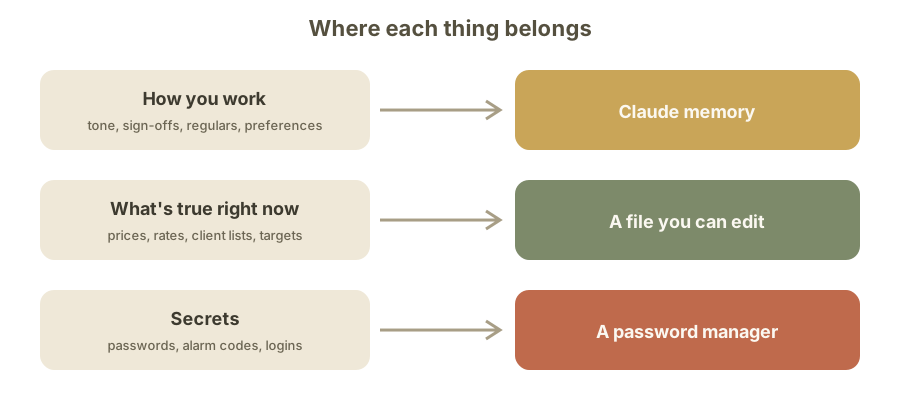
One line to remember: memory is for how you work, files are for what's true right now, and password managers are for secrets.
The Team plan question the guides get wrong
While researching this I found published guides disagreeing about whether the Team plan has its data used for training. One says Team behaves like the consumer plans. Others say the opposite. So I traced it through Anthropic's own pages, the same way I priced every tool from its official page for my AI agent cost breakdown for SMEs.
The consumer article on model training covers "Claude Free, Pro, Max". Data is used only if you "choose to allow us to use your chats and coding sessions to improve Claude", or if something is flagged for safety. However, the Team plan isn't mentioned in it at all. It points business readers elsewhere: "For our commercial products such as Claude for Work and the Anthropic API, see here."
The commercial article says: "By default, we will not use your inputs or outputs from our commercial products (e.g. Claude for Work, Anthropic API, Claude Gov, etc.) to train our models."
As a result, everything turns on one question: is the Team plan one of those "commercial products"? Here's why the guides disagree. For example, the pricing page doesn't say. The Consumer Terms of Service cover "Claude.ai, Claude Pro, and other products and services that we may offer for individuals" and state that "If you are acting on behalf of an organization, company, or other entity, our Commercial Terms of Service govern your use", without naming Team either.
The plain answer exists, but you have to dig for it. A Privacy Center FAQ about data processors and controllers states: "When a commercial customer creates a Claude for Work account (Team or Enterprise plan), under our Commercial Terms of Service the customer is the 'Controller' of the data submitted by its Users."
There it is. Team is Claude for Work, and Claude for Work doesn't train on your data by default. In fact, that sentence is the only place I found the connection stated plainly: not on the pricing page, not in either set of Terms, not in the training articles. That buried FAQ is why the guides disagree. If you're on Team and this matters to you, that's the page to bookmark, and it's still worth confirming with Anthropic directly for anything contractual.
What I couldn't answer
Two things, said plainly.
I couldn't find a setting to keep memory only on your own machine. The closest thing is a behaviour, not a setting: local Cowork sessions don't use memory at all. Meanwhile, memory itself lives with your account and follows you across devices. If you work in a field where information isn't allowed to leave your premises, that's a real question worth asking before you build anything on top of this.
And Anthropic's memory announcement doesn't address whether memory is used for training. So don't take that from me or from anyone else. Open your own privacy settings and read the toggle. It differs by plan and, importantly, it has changed more than once.
The ninety seconds
Open Settings → Memory → Topics. Read down the list. Run the three questions on each item. Take out the four, check for the other three, and leave everything that makes Claude sound like you. Then, if you're deciding what else belongs alongside Claude, my breakdown of the best AI agent stack for a one-person business is the natural next read.
If you'd like the version you can print and work through, it's free at Eduk8agentic.com, no email required. It covers the three questions, all seven categories, where each thing belongs, and a one-page policy to hand to anyone else who uses Claude in your business.
Frequently Asked Questions
- Is Claude memory on by default?
- Yes, on the Free, Pro and Max plans. Specifically, since 25 August 2026 memory is on by default across web, desktop and mobile. On Team and Enterprise plans it's off until an admin turns it on. You can disable it entirely, or review and delete individual items under Settings → Memory → Topics.
- How do I see and delete what Claude remembers about me?
- Open Settings → Memory → Topics. Everything stored is listed as entries you can read, edit, or delete one by one. In addition, for a business cleanup, run each item through three tests: would it embarrass you on a shared screen, could it damage a misdirected draft, and will it still be true in three months?
- Does Claude use my conversations to train its models?
- On Free, Pro and Max, only if you've allowed it in your privacy settings, or if a conversation is flagged for safety review. However, commercial products are not used for training by default. The setting differs by plan and has changed more than once, so check your own toggle rather than relying on any guide.
- Does the Claude Team plan train on my company's data?
- Not by default. The commercial policy states inputs and outputs from commercial products aren't used for training, and a Privacy Center FAQ confirms a Team or Enterprise account is a "Claude for Work" account. Notably, that connection is stated only in that FAQ, which is why so many guides disagree about it.
- Do my files stay on my computer when I use Claude Cowork?
- Not in cloud sessions. The folder-access prompt states that files leave your device and are processed on Anthropic's servers, and cloud Cowork is where the shared memory applies. Meanwhile, local Cowork sessions keep work on your machine and don't use memory. From 6 October 2026, new Cowork tasks on Pro and Max run in the cloud. Claude Code runs locally when you use it in your terminal, and it also runs on the web and in the Claude mobile apps.
Sources & Further Reading
- Claude's memory works everywhere, and you decide what's in it, Anthropic
- Use Claude's chat search and memory to build on previous context, Anthropic Help Center
- Release notes, Anthropic Help Center
- Is my data used for model training? (consumer), Anthropic Privacy Center
- Is my data used for model training? (commercial), Anthropic Privacy Center
- Does Anthropic Act as a Data Processor or Controller?, Anthropic Privacy Center
- Consumer Terms of Service, Anthropic
- Claude Cowork architecture overview, Anthropic Help Center
- Claude Desktop changelog, Anthropic
- Claude Code, Anthropic
- Claude Cowork finally remembers what you told the app in chat, TechCrunch
- Claude and Cowork now share what they know about you, The Register
About the Author
Zara Hunter is the founder of Eduk8agentic, a Claude Community Ambassador for EMEA, and creator of the Three-Engine Model, a plain-English framework for understanding agentic AI. She sets Claude up in businesses and trains people who don’t code to use it, from everyday questions to whole tasks and Claude Code. Read full bio.